
monorepo
mutirepo vs monorepo
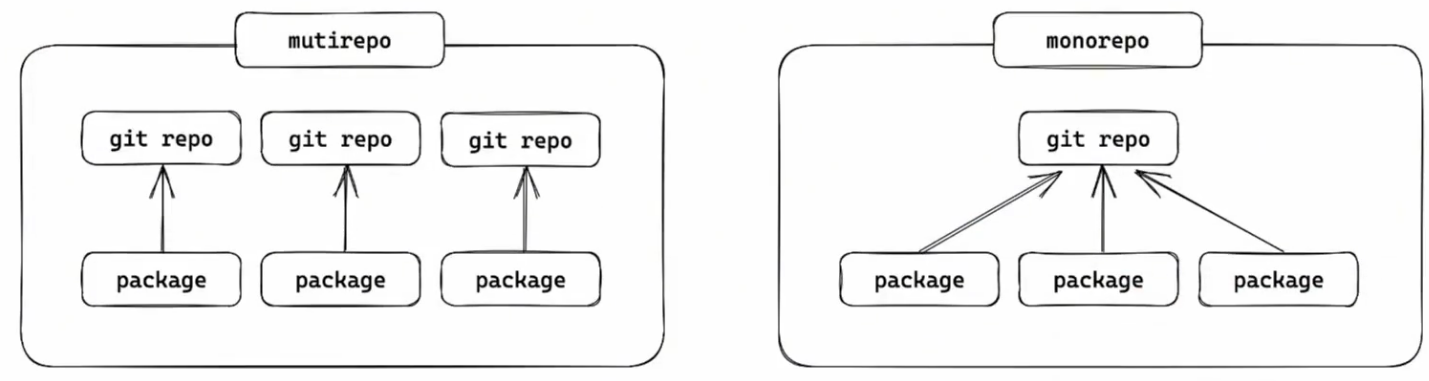
多仓管理(mutirepo):一个包一个仓库 单仓管理(monorepo):多个包在一个仓库
常见的monorepo管理工具:
- pnpm
- npm
- Yarn
- Lerna
- Nx
- Turborepo
- Rush
- ...
monorepo是一种管理模式,主要解决两个问题:规范的统一规管理和代码的统一化管理。
- 规范的统一化管理
- 环境的统一管理
- 代码风格和格式的统一管理
- git提交规范的管理
- 代码的统一化管理
- 统一打包
- 统一建立包依赖
- 统一测试
- 发布
pnpm monorepo
touch pnpm-workspace.yaml下面的yaml文件就是为了告诉工程,哪些是子包,这里packages和apps目录下的所有子包都属于这个monorepo。
# pnpm-workspace.yaml

packages:
  - 'packages/*'
  - 'apps/*'
执行工程级命令
pnpm --workspace-root [...]或
pnpm -w [...]上面的两个命令意思都是在工程根目录下执行命令。
执行子包命令
进入子目录或
pnpm -C 子包路径 [...]环境版本锁定
凡是要对很多子包做统一处理,都在根目录工程中完成 所以在根目录的package.json中锁定环境版本。
"engines":{
    "node": ">=22.14.0",
    "npm": ">=10.9.2",
    "pnpm": ">=10.15.1",
}下面是.npmrc文件,用来强制使用上面锁定的版本。在根目录下创建.npmrc文件。如果现在用的版本低于上面锁定的版本,则会报错。而不是警告
# .npmrc

engine-strict=true
TypeScript
pnpm -Dw add typescript @types/nodetouch tsconfig.json// tsconfig.json
{
"compilerOptions": {
"baseUrl": ".",
"module": "ESNext",
"target": "ESNext",
"types": [],
"lib": ["ESNext"],
"sourceMap": true,
"declaration": true,
"declarationMap": true,
"noUncheckedIndexedAccess": true,
"exactOptionalPropertyTypes": true,
"strict": true,
"verbatimModuleSyntax": false,
"moduleResolution": "bundler",
"isolatedModules": true,
"nnoUncheckedSideEffectImports": true,
"moduleDetection": "force",
"skipLibCheck": true,
}.
"exclude": ["node_modules", "dist"],
}然后具体的子包中,ts的配置不一样可以继承根目录的配置,然后做单独的配置。
{
    "extends": "../../tsconfig.json",
    "compilerOptions": {
        // 这里可以单独配置
        "types": ["node"],
        "lib":  ["ESNext"],
    },
    "include": ["src"],
}
代码风格与质量检查
prettier
pnpm -Dw add prettiertouch prettier.conifg.js// prettier.config.js
/**
* @type {import('prettier').Config}
* @see https://www.prettier.cn/docs/options.html
*/
export default {
// 指定最大换行长度
printWidth: 120,
// 缩进制表符宽度 | 空格数
tabWidth: 2,
// 使用制表符而不是空格缩进行 (true | false)
useTabs: false,
// 结尾是否添加分号 (true | false)
semi: true,
// 使用单引号 (true | false)
singleQuote: true,
// 对象字面量中是否使用引号包裹属性 (as-needed | consistent | preserve)
quoteProps: 'as-needed',
// 在JSX中使用单引号而不是双引号
jsxSingleQuote: false,
// 在对象,数组括号与文字之间加空格 "{ foo: bar }"
bracketSpacing: true,
// 将 > 多行元素放到最后一行的末尾,而不是单独放在下一行 (true | false)
bracketSameLine: false,
// (x) => x 箭头函数参数只有一个时是否带有圆括号 (avoid|always)
arrowParens: 'always',
// 指定要使用的解析器,不需要写文件开头的 @prettier
requirePragma: false,
// 在文件顶部插入一个特殊的 @format marker 来指定如何格式化此文件 (true | false)
insertPragma: false,
// 用于控制文本是否应该被换行以及如何进行换行
proseWrap: 'preserve',
// 指定HTML文件的全局空白敏感度 (css | strict | false)
htmlWhitespaceSensitivity: 'css',
// Vue文件脚本和样式标签缩进大小
vueIndentScriptAndStyle: false,
// 换行符使用 lf 结尾是 \n,windows 使用 crlf 结尾是\r\n
endOfLine: 'lf',
// 这两个选项可以用于格式化以给定字符偏移量(分别包括和不包括)开始和结束的代码 (rangeStart, rangeEnd)
rangeStart: 0,
rangeEnd: Infinity,
}prettier忽略项
touch .prettierignore# .prettierignore
dist
node_modules
public
.local
pnpm-lock.yamlprettier脚本命令
"scripts": {
    "lint:prettier": "prettier --write \"**/*.{js,ts,mjs,cjs,json,tsx,css,less,scss,vue,html,md}\"",
}
执行命令
pnpm run lint:prettier
pnpm lint:prettier
eslint
pnpm -Dw add eslint@latest @eslint/js globals typescript-eslint eslint-plugin-prettier eslint-config-prettier eslint-plugin-vue| 类别 | 库名 |
|---|---|
| 核心引擎 | eslint |
| 官方规则集 | @eslint/js |
| 全局变量支持 | globals |
| TypeScript 支持 | typescript-eslint |
| 类型定义(辅助) | @types/node |
| Prettier 集成 | eslint-plugin-prettier, eslint-config-prettier |
| Vue.js 支持 | eslint-plugin-vue |
配置
touch eslint.config.jsimport { defineConfig } from 'eslint/config'
import eslint from '@eslint/js'
import tseslint from 'typescript-eslint'
import eslintPluginPrettier from 'eslint-plugin-prettier'
import eslintPluginVue from 'eslint-plugin-vue'
import globals from 'globals'
import eslintConfigPrettier from 'eslint-config-prettier'
const ignores = ["**/dist/**", "**/node_modules/**", ".*", "scripts/**", "**/*.d.ts"]
export default defineConfig({
// 通用怕配置
{
ignores, // 忽略项
extends: [eslint.configs.recommended, ...tseslint.configs.recommended, eslintConfigPPrettier], // 继承规则
plugins: {
prettier: eslintPluginPrettier,
}, // 插件
languageOptions: {
ecmaVersion: "latest", // ECMAScript版本
sourceType: "module", // 模块类型
parser: tseslint.parser, // 解析器
},
rules: {
// 自定义规则
}
},
// 前端配置
{
ignores,
files: ["apps/frontend/**/*.{vue,ts,js,tsx,jsx}", "packages/components/**/*.{ts,js,tsx,jsx.vue}"], // 只对前端项目生效
extends: [...eslintPluginVue.configs["rlat/recommended"], eslintConfigPrettier],
languageOptions: {
globals: {
...globals.browser
}
}
},
// 后端配置
{
ignores,
files: ["apps/backend/**/*.{ts,js}"], // 只对后端项目生效
languageOptions: {
globals: {
...globals.node
}
}
}
})脚本命令
"scripts": {
    "lint:eslint": "eslint",
}
执行命令
pnpm run lint:eslint
pnpm lint:eslint
拼写检查
vscode 插件:Code Spell Checker
pnpm -Dw add cspell @cspell/dict-lorem-ipsum配置
touch cspell.json
{
    "import": ["@cspell/dict-lorem-ipsum/cspell-ext.json"],
    "caseSensitive": false,
    // 自定义字典
    "dictionaries": ["custom-dictionary"],
    // 自定义字典路径和是否添加单词到字典中
    "dictionaryDefinitions": [
        {
            "name": "custom-dictionary",
            "path": "./.cspell/custom-dictionary.txt",
            "addWords": true
        }
    ],
    "ignorePaths": [
        "**/node_modules/**",
        "**/dist/**",
        "**/build/**",
        "**/lib/**",
        "**/docs/**",
        "**/vendor/**",
        "**/public/**",
        "**/static/**",
        "**/out/**",
        "**/tmp/**",
        "**/package.json",
        "**/*.md",
        "**/*.d.ts",
        "**/stats.html",
        "eslint.config.js",
        ".gitignore",
        ".prettierignore",
        "cspell.json",
        "commitlint.config.js",
        ".cspell"
    ]
}
这里注意要建立字典文件
mkdir -p ./.cspell && touch ./.cspell/custom-dictionary.txt脚本命令
"scripts": {
    "lint:spellcheck": "cspell lint \"(packages|apps)/**/*.{js,ts,mjs,cjs,json.css,less,scss,vue,html,md}\"",
}
执行命令
pnpm run lint:spellcheck
pnpm lint:spellcheck
git提交规范
git仓库创建
touch .gitignore# .gitignore
# Node
node_modules/
dist/
build/
.env
.env.*
*.log
npm-debug.log*
yarn-debug.log*
yarn-error.log*
pnpm-debug.log*
# IDE
.vscode/
.idea/
*.suo
*.ntvs*
*.njsproj
*.sln
*.sw?
# OS
.DS_Store
Thumbs.db
# TypeScript
*.tsbuildinfo
# Misc
coverage/
*.local
*.cache
*.tmp
# Git
.git/git initcommitizen
安装
pnpm -Dw add @commitlint/cli @commitlint/config-conventional commitizen cz-git@commitlint/cli:是commitlint工具的核心@commitlint/config-conventional:是基于conventional commits规范的配置文件commitizen:提供了一个交互式撰写commit信息的插件cz-git:国人开发的工具,工程性更强,自定义更高,交互性更好。
配置命令
// package.json

"scripts": {
    "commit": "git-cz",
},
"config": {
    "commitizen": {
        "path": "node_modules/cz-git"
    }
}配置cz-git
touch commitlint.config.js/** @type {import('cz-git').UserConfig} */
export default {
extends: ["@commitlint/config-conventional"],
rules: {
// @see: https://commitlint.js.org/#/reference-rules
"body-leading-blank": [2, "always"],
"footer-leading-blank": [1, "always"],
"header-max-length": [2, "always", 108],
"subject-empty": [2, "never"],
"type-empty": [2, "never"],
"subject-case": [0],
"type-enum": [
2,
"always",
[
"feat", // 新功能(feature)
"fix", // 修复bug
"docs", // 文档(documentation)
"style", // 格式(不影响代码运行的变动)
"refactor", // 重构(即不是新增功能,也不是修改bug的代码变动)
"perf", // 性能优化
"test", // 增加测试
"build", // 构建过程或辅助工具的变动
"ci", // CI配置文件和脚本
"chore", // 其他工具变动(不在改动范围的)
"revert", // 回退
"wip", // 开发中
"workflow", // 工作流改进
"types", // 类型(TypeScript声明文件改动)
"release", // 发布版本
]
]
},
prompt: {
types: [
{ value: "feat", name:"✨新功能: 新增功能"},
{ value: "fix", name:"🐛修复bug"},
{ value: "docs", name:"📚文档: 更新文档"},
{ value: "style", name:"🎨样式:格式调整(不影响代码运行)"},
{ value: "refactor", name:"♻️重构:代码重构(不包括 bug 修复、功能新增)"},
{ value: "perf", name:"⚡️性能优化"},
{ value: "test", name:"🧪测试: 增加或修改测试"},
{ value: "build", name:"📦构建: 修改项目构建或外部依赖(例如 scopes: npm)"},
{ value: "ci", name:"👷CI: 修改 CI 配置、脚本"},
{ value: "chore", name:"🔨其他: 更新脚手架配置或依赖"},
{ value: "revert", name:"⏪回退"},
{ value: "wip", name:"🚧开发中"},
{ value: "workflow", name:"📋工作流"},
{ value: "types", name:"🔍类型"},
{ value: "release", name:"🚀发布" }
],
// 自定义范围(可选)
scopes: ["root","backend","frontend","components","utils"],
// 允许自定义范围(可选)
allowCustomScopes: true,
// 跳过详细描述和底部信息
skipQuestions: ["body", "footerPrefix","footer","breaking"],
messages: {
type: "📌 请选择提交类型:",
scope: "🎯 请选择影响范围(可选):",
subject: "✍ 请简要描述更改:",
body: "🔍️ 请输入详细描述(可选):",
footer: "🔗 关联的 ISSUE 或 BREAKING CHANGE (可选):",
confirmCommit: "✅ 确认提交?"
}
}
}提交操作
git add .
pnpm commit
husky
提交前校验代码规范,防止不规范提交到仓库中。
安装
pnpm -Dw add husky初始化
pnpx husky init初始化以后会在项目根目录下生成.husky文件夹,在里面会生成pre-commit文件。 向pre-commit文件中添加命令如下配置:
#!/usr/bin/env sh
pnpm lint:prettier && pnpm lint:eslint && pnpm lint:spellcheck
lint-staged
检查暂存区的文件是否符合规范,不符合则不允许提交。
安装
pnpm -Dw add lint-staged配置命令
"scripts": {
    "precommit": "lint-staged"
}这里写成precommit,git-cz内部有个机制,它会自动调用precommit钩子。
配置文件
// .lintstagedrc.js

export default {
    "*.{js,ts,mjs,cjs,json,tsx,css,less,scss,vue,html,md}": ["cspell lint"],
    "*.{js,ts,vue,md}": ["prettier --write", "eslint"],
}因为有时候可能习惯了git commit, 这个时候没使用git-cz,所以这个时候就不会触发检查,因此这里最好的办法就是修改对应的json文件的方法名然后重新配置husky
"scripts": {
    "lint:lint-staged": "lint-staged",
}#!/usr/bin/env sh
pnpm lint:lint-staged公共库打包
这里公共库打包要注意如下:
- 业务代码可以单独打包,配合docker容器进行部署。
- 公共库打包的时候必须统一打包管理,因为公共库之间如果有依赖,那么打包的时候就必须保证公共库的版本一致。
子包间依赖
在开发的时候直接引入本地库
"dependencies": {
    "@xxx/xxx": "workspace:*",
    "@xxx/yyy": "workspace:*"
}这里要注意因为我们使用的是modules,所以在本地导入的时候,需要配置package.json指定文件出口和类型文件
{
    "module": "./dist/xxx.esm.js",
    "types": "./dist/xxx.d.ts"
}
单元测试
pnpm -Dw add vitest @vitest/browser vitest-browser-vue vuevitest: 核心测试框架@vitest/browser: 内置了无头浏览器用来测试浏览器环境下的代码vitest-browser-vue: 测试vue组件的插件
命令
"scripts": {
    "test": "vitest",
}
配置文件
// vitest.config.js

import { defineConfig } from "vitest/config";
export default defineConfig({
    test: {
        ...
    }
});然后在对应的文件夹中建立__test___文件夹,然后在里面建立测试文件,测试文件命名以.test.ts结尾。 这样在运行vitest的时候就会自动找到这些文件进行测试。
发布
- 首先就是配置
package.json文件,在里面配置version,files,main,module,types等字段。 - 换到npm官方源
npm whoami查看当前登录的用户(注意登录的名字要和package.json里面的名字一致)npm login登录npm publish发布